
Three tiers. One weekly quota per tier. A handful of differences in exchange coverage, history depth, and key limits. Picking the right one isn't complicated — but it does depend on what you're actually building, and it's worth ten minutes of thought before you commit.
This article is the honest version. Which tier covers a light daily workflow? Which one covers a serious research setup? When does the Hero tier pay for itself? We'll go through each level, who it's for, and how to tell when you've outgrown it. (For current pricing, see the Cryptohopper pricing page.)
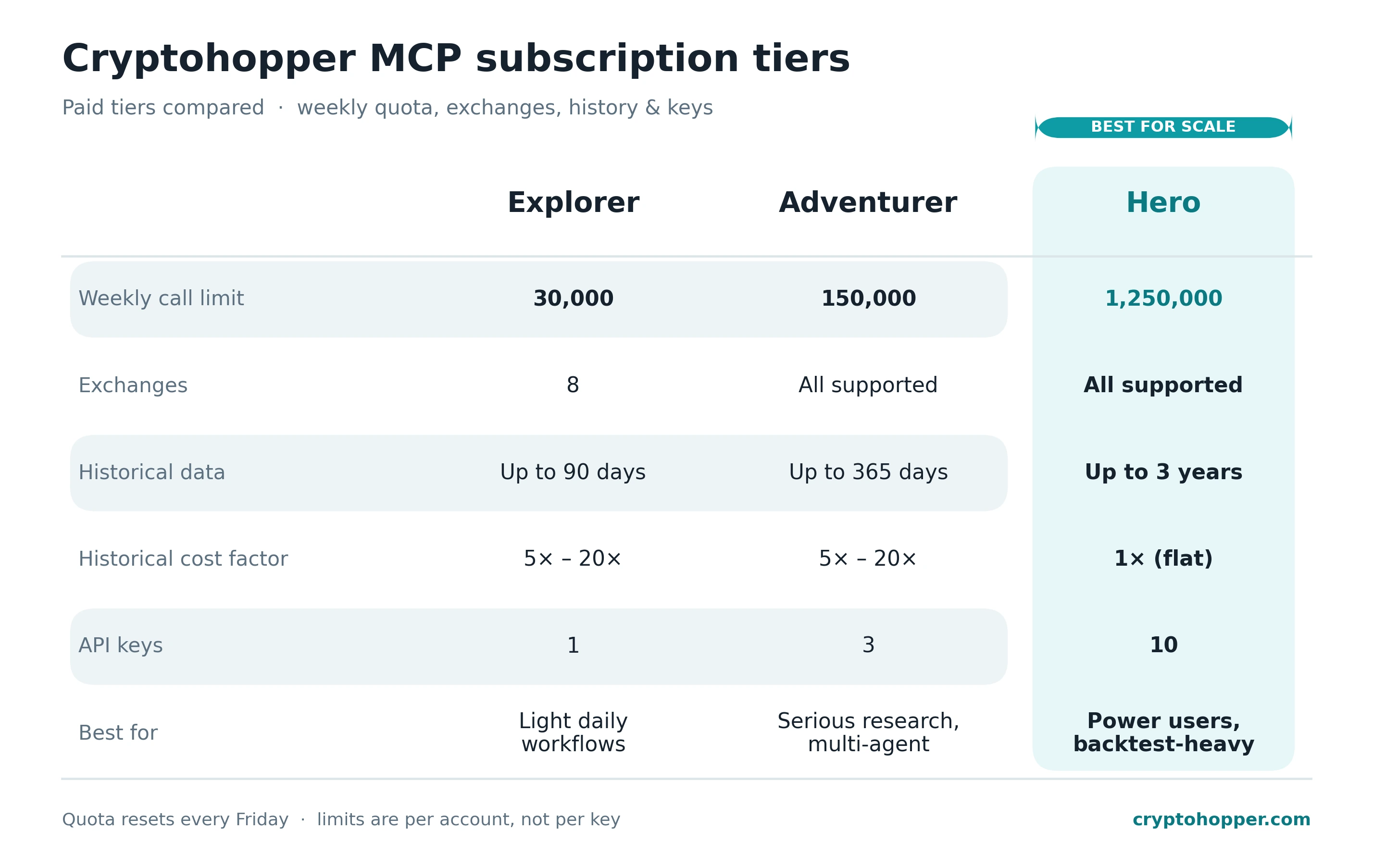
The three Cryptohopper MCP tiers at a glance — Explorer, Adventurer, and Hero.
Quota resets every Friday. Both the weekly call limit and the per-user rate limit apply across all your keys — not per key. That matters if you start running multiple agents: making a second key doesn't give you a second quota.
Historical data carries a cost multiplier on most tiers. Asking for 100 candles of recent history might count as 1 call; asking for 1,000 candles reaching back a month might count as 20. The rate limits reference has the exact mechanics. The Hero tier is the only one where all calls count as 1× regardless of lookback.
Explorer — the entry tier
30,000 calls a week, 8 exchanges, and access to 90 days of history. This is where most people start once they're actually using the MCP day to day.
What you get:
- A genuine working quota. 30,000 calls a week leaves room for a real daily workflow plus some experimentation alongside.
- 8 exchanges. Covers the majority of what a retail trader actually touches.
- 90 days of history. Enough for any indicator you care about — RSI, MACD, Bollinger, ATR — and enough for meaningful short-term backtests.
Explorer works for you if:
- You run a daily workflow or two and want to tinker on top.
- Your exchanges fit within the 8-venue list.
- You need candle history but not back a whole year.
- You're a single user, not running a fleet of agents.
You'll hit a wall when:
- You're on an exchange Explorer doesn't cover — the smaller exotic venues.
- You need more than 90 days of data for a backtest or long-term analysis.
- You want to run multiple distinct agents (one research, one monitoring, one experimentation) and keep their quotas separate — harder on one key.
- Your workflows grow past the 30,000-calls/week threshold. Ticker scans are fine. Frequent orderbook pulls across many pairs will get you there.
For most serious-but-not-power-user setups, Explorer is the sweet spot. If you're constantly bumping quota, Adventurer is the natural next step.
Adventurer — serious research, multi-agent
150,000 calls a week. All supported exchanges unlocked. A year of history. Three API keys, which for the first time makes it reasonable to separate different agents onto different keys.
The year of history is the quiet game-changer. At Explorer you're constrained to short-term analyses; at Adventurer you can run year-over-year comparisons, longer backtests, and deeper regime studies without hitting the history wall.
Adventurer works for you if:
- You're running multiple workflows — say, a daily report, an on-demand TA assistant, and a weekend backtesting rig — and it's starting to feel cramped.
- You want to segment agents by key so rotating or revoking one doesn't break the others. See how to run multiple agents with multiple API keys.
- You care about long-tail exchanges that aren't in Explorer's list.
- A year of history is enough for you — most backtests are.
You'll hit a wall when:
- 150,000 calls a week starts to feel tight. This usually means you're loop-polling orderbooks or candles across many pairs.
- You need three keys or fewer — but realistically, at this usage level, the natural progression is toward Hero.
- You need history beyond one year.
For a lot of power users, Adventurer is the ceiling. If you're not running dozens of scheduled workflows or doing heavy quant backtesting, you probably don't need to go further.
Hero — the quant / institutional tier
1.25 million calls per week. All exchanges. Three years of history. Ten API keys. And — the subtle but important one — all historical queries count as 1×, no cost multiplier.
That last point matters more than it sounds. On lower tiers, a long-history candle pull can cost 20× a basic call. On Hero, a request for three years of daily candles costs the same as a request for twenty. This is the tier designed for people who treat the MCP as a data source, not just a workflow tool.
Hero works for you if:
- You're running institutional-style backtests where deep history pulls are routine.
- You have many agents or many workflows, and want a key per logical consumer.
- You want the lookback cost factor out of your mental model — just run your queries, don't engineer them around a multiplier.
- Your usage is simply too heavy for Adventurer, whatever the shape.
At this level, most users are either running small prop setups, serious quant research, or products of their own on top of the MCP. If your usage looks nothing like that, you probably don't need Hero.
How to pick — a quick decision tree
- Running daily workflows on the big exchanges, no heavy backtests? → Explorer.
- Multiple agents, year-long analyses, or an exchange outside Explorer's list? → Adventurer.
- Institutional backtests, long history, many keys, or just running hot? → Hero.
When in doubt, go one tier lower than you think. Upgrading is easy. What's hard is justifying a tier you don't actually use.
A practical note on quota mechanics
Two points worth tattooing:
Quota is per-user, not per-key. Making a second API key does not double your weekly allowance. Keys are for separation (rotate without breaking other agents) and for attribution (know which agent is spending what) — not for quota multiplication.
Lookback depth costs quota. On every tier except Hero, asking for longer candle histories costs more. An agent pulling 1,000 candles per request will eat through its weekly allowance four or five times faster than one pulling 150. Keep your lookbacks tight — see a practical guide to candles for how much history indicators actually need.
If you want to see exactly how much of your quota is gone this week, just ask: "How much of my Cryptohopper MCP quota have I used this week?" — the MCP exposes a usage endpoint your agent can call. Full details in how to check your usage and limits.
The bottom line
For most people reading this, Explorer is the right starting point — and the right upgrade path, if you hit limits, is Adventurer. Hero is the tier where the MCP stops being a workflow tool and starts being a data pipeline, and if that's where you're headed you'll know it.
Start with Explorer, prove out the workflow, and scale up once you know it's worth it. If you've built something useful and you're bumping into limits, upgrading to unlock more is easy; if you haven't, upgrading won't rescue the idea.


_webp.webp&w=1920&q=75)
_webp.webp&w=1920&q=75)