
Most of the fun of connecting an AI agent to a market-data server is the sudden feeling that you could build almost anything. A personal trading research assistant. A morning digest. A cross-exchange scanner. A slippage calculator that lives inside your IDE.
Here are ten concrete things you can build today with the Cryptohopper Market Data MCP, ordered roughly from beginner-friendly to power-user. Skim, pick the idea that excites you most, and build from there.
1. A daily top-movers report, delivered to Telegram
Every morning, your agent scans the biggest exchanges for the pairs that have moved the most over the last 24 hours — gainers, losers, and anything with abnormal volume — and sends you a neat summary over Telegram, Discord, or email before you've finished your coffee.
You're using the MCP's ticker endpoints here, which are cheap on quota and fast. Schedule it with cron on Mac, Task Scheduler on Windows, or GitHub Actions if you prefer the cloud.
2. On-demand technical analysis on any token
Type "give me a TA on SOL" in your IDE and get back: current trend, realised volatility, support and resistance levels, RSI and MACD readings, a 1h/4h multi-timeframe alignment check, and — if you want — a suggested grid range.
This is the single most common use people report. It replaces ten minutes of clicking around in TradingView with a three-second conversation. The agent pulls candles via the MCP, computes the indicators itself, and writes the summary in plain English.
3. A cross-exchange arbitrage scanner
Same pair, different venue, different price. Sometimes the gap is big enough to matter, sometimes it's not. Build an agent that watches your favourite pairs across Binance, Kraken, OKX, Bybit, and Coinbase, and alerts you when a persistent gap opens up — with the spread, the depth on both sides, and a rough estimate of whether the trade is actually executable after fees.
This is one of those workflows where a data-only MCP shines: you don't need an execution feed from every exchange, you just need aggregated tickers, and the agent does the comparison in-context.
4. A slippage estimator for large orders
If you're about to put $50k into BTC, it matters which venue you use. Liquidity shifts minute-to-minute, and the spread is only part of the story — what's on the book ten levels deep is what determines your actual fill price.
Build a slippage estimator that takes an order size and returns the expected average fill across the exchanges you care about, ranked cheapest first. The agent pulls orderbooks, walks the levels, and runs the VWAP simulation in one call.
5. A volume spike scanner for the top 200 pairs
Abnormal volume is one of the earliest signals that something is happening — a listing, a whale, an event. A volume scanner takes the top 200 pairs by baseline volume, compares the current 24h volume to its 7-day rolling average, and flags anything that's more than, say, 3× normal.
Tickers are extremely cheap to fetch, so this kind of scanner fits comfortably within your weekly quota if you keep the cadence sensible. Put the alert on Telegram so you see it wherever you are.
6. An AI-powered watchlist dashboard
Pick your 10–20 favourite tokens. Every morning, the agent produces a digest: current price, 24h change, trend direction, RSI, a one-line note if anything has changed materially from yesterday. Delivered wherever you read — email, Notion, Slack, Telegram.
Think of it as a bespoke terminal, shaped exactly around the coins you care about, written by an AI that can notice things a static dashboard can't.
7. A multi-timeframe confluence alert
A signal that only shows up on one timeframe is noise as often as it's a setup. The moves worth paying attention to tend to line up across several timeframes at once — the 15m, the 1h, the 4h, and the daily all pointing the same way.
Build an agent that pulls candles for a pair across 15m, 1h, 4h, and 1d, checks each for trend direction and momentum, and only pings you when a meaningful number of them agree — say, three of four bullish, or all four bearish. The rest of the time it stays quiet, which is exactly what you want from an alert.
It's a clean fit for the MCP: every one of those timeframes is a native candle period, so the whole confluence check is a handful of calls and a bit of in-context reasoning. Silence is the correct output most of the time.
8. A news-driven research workflow
Feed an LLM a news headline — or a CoinTelegraph article, or a tweet — and have it identify mentioned tokens, then immediately run TA on each one via the MCP. Output: a summary that says "Token X is the subject of this article. Its 4h chart is in a clear uptrend with RSI at 68 and volume up 210% vs. the 7-day average. Here's what to watch for."
This is genuinely new capability. A year ago, no one was stitching this together. Today it's a 200-line script.
9. A BTC vs. Nasdaq correlation tracker
Crypto doesn't trade in a vacuum. There are stretches where Bitcoin moves in near-lockstep with tech equities, and stretches where it decouples entirely — and knowing which regime you're in changes how much weight you give a "crypto" thesis versus a "risk-on/risk-off" one.
Here the work is split: the MCP supplies the crypto side — BTC's candles and recent price action — and the agent brings the Nasdaq side in from outside the MCP, since it's an equities index, not a spot crypto pair. The agent lines the two series up, computes a rolling correlation, and tells you in plain English whether crypto is currently tracking the stock market or trading on its own.
This is a nice illustration of the MCP as one component rather than the whole system: it owns the data it's good at, and the agent stitches in everything else.
10. An AI crypto research assistant you can talk to like a person
Not a single workflow so much as a way of using everything above at once. Set up Claude Code or the Claude desktop app with the Cryptohopper MCP, open it whenever you'd normally open TradingView, and talk to your research.
"What's the cheapest venue to buy 10 ETH right now?"
"Is SOL trending or ranging on the 4h?"
"Compare BTC's realised volatility this week against the last month."
"Scan the top 50 pairs and show me anything with an unusual volume pattern."
"Summarise today's moves for my watchlist."
There's no script to write. The agent picks the right MCP tool for each question and answers in plain English. It's the most straightforward use of the MCP and it's the one that ends up replacing the most tabs in your browser.
Where to start
If you're new to the MCP, start with #2 (on-demand TA) — it's the clearest "oh, I get it" moment — and then #1 (daily report) because it's the first one that gives you value passively.
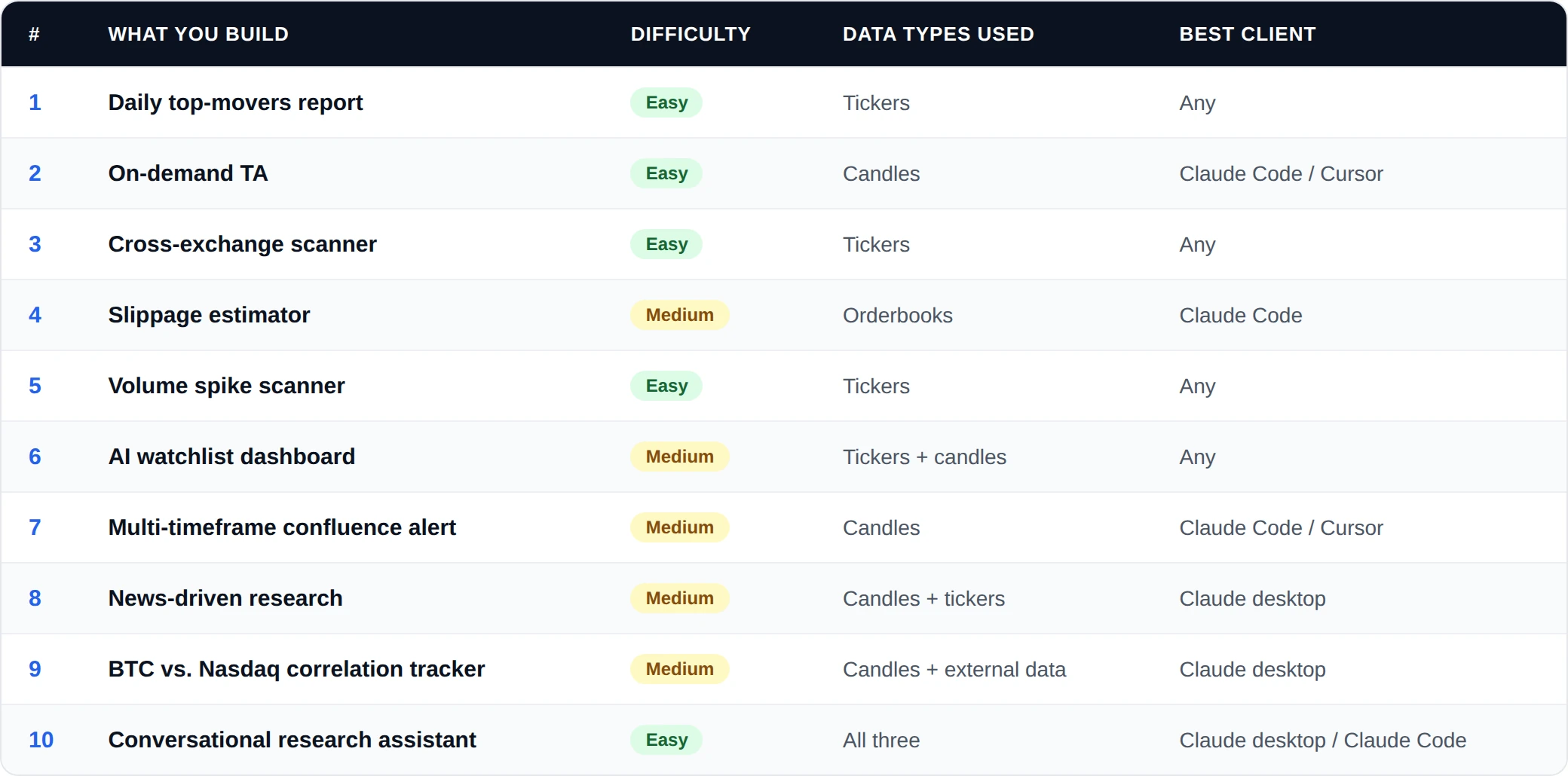
If you already know what you want to build, scan the table below and jump straight in.
Beyond the list
This is a starter menu. Once you're comfortable, the MCP becomes a foundation — you start building your own workflows. A few more patterns we've seen in the wild:
- Regime labellers that tag each day of the last 90 days as trending or ranging using candle data.
- Liquidity wall trackers that flag large orderbook clusters within 2% of mid-price.
- DCA range pickers that look at historical drawdowns to suggest entry bands.
- Stacking MCPs — pairing Cryptohopper's market data with an on-chain MCP for a whole-market view.
If you build something worth telling us about, we'd love to see it — and probably write about it.
The common thread
The thing that connects all ten of these is that none of them would be reasonable to build without MCP. Either they'd take days of glue code (Python + five exchange APIs + rate-limit handling + JSON normalisation), or they'd be impossible entirely (feeding live market data into a conversational AI in a way that actually works).
MCP collapses that setup cost to zero. Which means the bar for "is this worth building?" drops from "a weekend project" to "a five-minute experiment". That is a meaningfully different world to operate in — and it's worth getting set up in it while the category is still young.
Start with the complete setup guide, pick one of the ideas above, and build something by the end of the day.


_webp.webp&w=1920&q=75)
_webp.webp&w=1920&q=75)